
Our Tech Stack for Building Client Projects in 2026: Tools, Infra, and Why
A transparent look at the tech stack StackSpace uses to build client projects in 2026 — the frontend, backend, database, infrastructure, and AI tools we default to, the criteria we choose them on, and where we deliberately deviate.
What's in StackSpace's Tech Stack for 2026?
Our default 2026 stack is Next.js and React Native on the front end, a TypeScript API layer over PostgreSQL on the back end, deployed on Vercel and managed cloud infrastructure, with an AI layer built on Claude and lightweight agent patterns. We treat it as a starting point, not a religion — every project begins here and deviates only when there's a concrete reason to.
The honest version of "what's your tech stack" is that the question is slightly wrong. A studio that builds for many clients doesn't have one stack — it has a default stack and a disciplined set of rules for when to leave it. The default is what lets us move fast, hire predictably, and hand a codebase to a client's in-house team a year later without an archaeology project. The deviations are where we earn our fee, because picking the right tool for a specific problem is most of the job.
This post is the transparent version: the actual tools, the layer-by-layer breakdown, the criteria we judge every choice against, and — just as important — what we deliberately don't use and why. If you're a founder evaluating a partner, or a developer curious how a Manila studio ships in 2026, this is the real list.
The Principles Behind Our Stack (Why These Tools)
We choose tools on five criteria: speed to first working version, long-term maintainability, the local hiring pool, total cost of ownership, and how easily we can leave the tool later. A technology has to score well across all five to become a default — being exciting isn't enough, and neither is being popular.
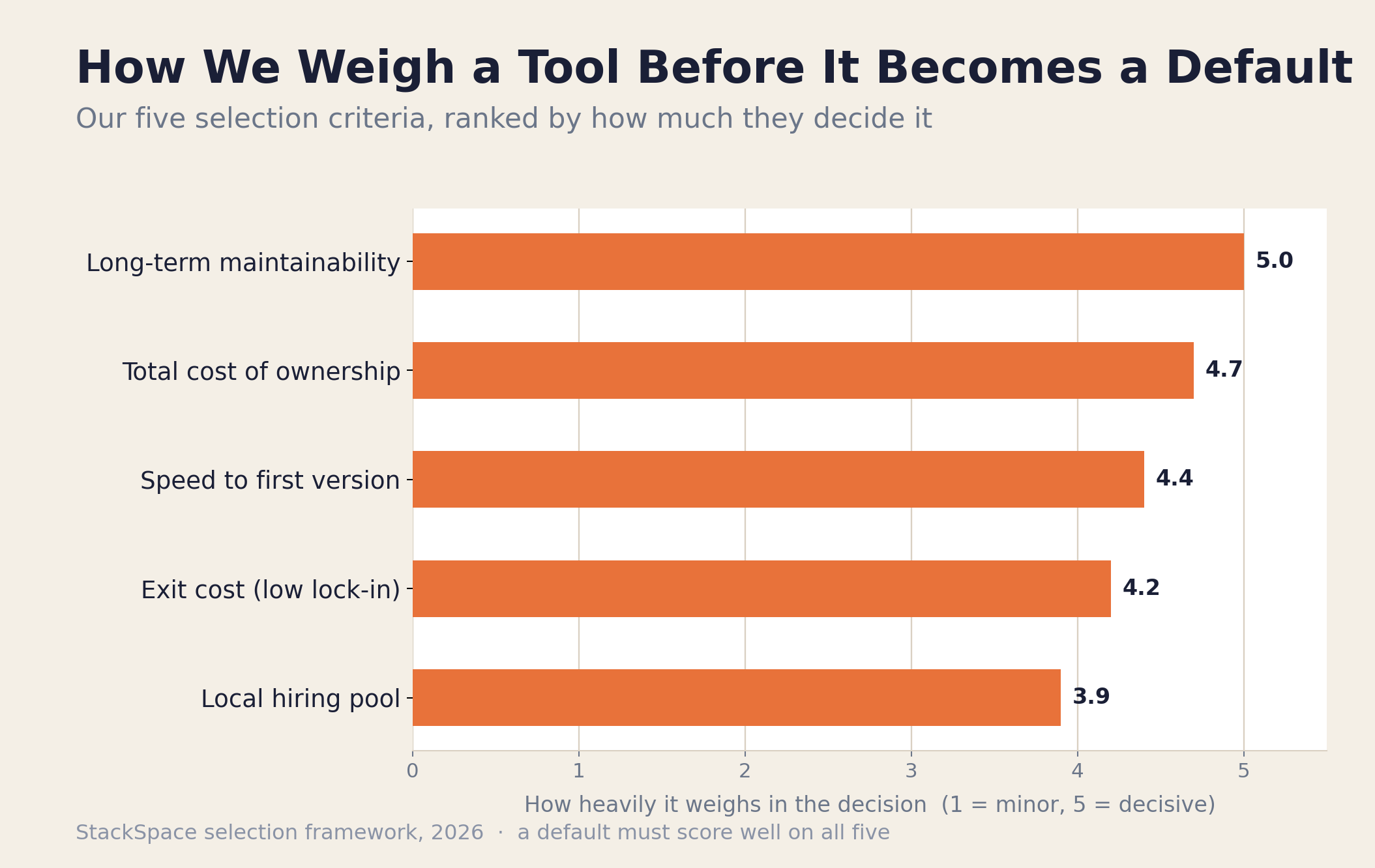
Most bad stack decisions come from optimizing one criterion and ignoring the rest. Here's how we weigh each:
- Speed to first working version. A client should see something real in weeks, not quarters. Tools that let us skip undifferentiated plumbing — auth, file storage, a database schema — are worth a lot. This is the criterion that earns the most short-term love and causes the most long-term regret if it's the only one you weigh.
- Long-term maintainability. The code outlives the engagement. We favor boring, well-documented, widely-understood tools over clever ones, because the person maintaining this in 2028 might be a junior on the client's team, not us.
- The local hiring pool. We build in the Philippines and our clients often hire to maintain. A stack that thousands of Manila and Cebu developers already know is a feature. Picking a niche language because it's elegant strands the client.
- Total cost of ownership. Not just the build — the monthly bill, the upgrade tax, the licensing, the cost of the next feature. We covered how this compounds in The True Cost of Building a Custom Web Application.
- Exit cost. How hard is it to leave? Open standards, portable data, and open-source cores beat proprietary lock-in. We never want a client trapped, and we never want to be trapped on a client's behalf.
When a tool wins on all five, it becomes a default. When a project's specifics tip one criterion hard — strict data residency, extreme scale, an unusual platform target — we deviate, and we document why so the next engineer understands the choice.
The Frontend Stack: Next.js, React Native, and Tailwind
For web, we default to Next.js with React and TypeScript, styled with Tailwind CSS. For mobile, we default to React Native — and reach for fully native or Flutter only when a project's requirements demand it. The through-line is React, so a team that knows our web code can read our mobile code.
Next.js is our web default because it covers the widest range of project shapes from one framework: marketing sites, dashboards, customer portals, and full SaaS products all fit comfortably. Server-side rendering gives us SEO when we need it, the file-based routing keeps projects legible, and the React ecosystem means we're never stuck for a library or a hire. TypeScript is non-negotiable on anything beyond a throwaway — the type safety pays for itself the first time a refactor touches forty files.
On mobile, React Native lets one team ship iOS and Android from a shared codebase, which is the right economics for most client budgets. We don't pretend it's always right — graphics-heavy apps, deep platform integrations, or performance-critical experiences sometimes justify going native, and occasionally Flutter is the better fit. We walk through exactly how we make that call in Next.js vs React Native vs Flutter: How to Choose Your Stack in 2026. Tailwind rounds out the front end because utility-first CSS keeps styling consistent and reviewable without a sprawling stylesheet nobody dares to touch.
The Backend and API Layer
Our backend default is TypeScript end-to-end — either Supabase's managed services for speed, or a custom Node.js API (often with a framework like NestJS or Fastify) when the domain logic is heavy. Both sit in front of PostgreSQL, and both expose a clean, versioned API so any front end can consume them.
The reason we lead with TypeScript on both ends is simple: one language across the stack means one mental model, one set of tooling, and engineers who can move between front end and back end without context-switching. For a lot of products — SaaS apps, dashboards, MVPs — Supabase gets us a Postgres database, auth, file storage, and instant APIs in a day, which is enormous for speed to first version. When the business logic gets complex, the integrations get gnarly, or we need total control over how requests are handled, we build a dedicated Node service instead.
That "managed-versus-custom" decision is one of the most consequential we make, and it's rarely all-or-nothing — many projects use Supabase for the boring parts and a custom service for the parts that matter. We laid out the full trade-off in Supabase vs Firebase vs Custom Backend: A Practical Decision Guide. The principle: don't custom-build what a managed service does well, and don't outsource the logic that is your product.
The Data Layer: PostgreSQL by Default
Our database default is PostgreSQL, full stop, for the overwhelming majority of projects. It's relational, battle-tested, open source, and capable enough to handle relational data, JSON documents, full-text search, and AI vector search all in one engine — which means most projects never need a second database.
We default to Postgres because it almost never becomes the thing you regret. It scales further than most products will ever need, it has decades of operational knowledge behind it, and its extension ecosystem quietly absorbs requirements that used to mean adding infrastructure. The big one in 2026 is pgvector — it lets us store and query embeddings for AI features directly in the same database that holds the rest of the app's data, instead of bolting on a separate vector store. Fewer moving parts, one source of truth, lower operational burden.
We reach for other data stores only when a specific need justifies the added complexity: Redis when we genuinely need a fast cache or a job queue, object storage (S3-compatible) for files and media rather than stuffing them in the database, and a dedicated search engine only when Postgres full-text search has actually hit its limit. The discipline is to add a data store because the workload demands it — not because it's the fashionable choice this quarter.
Infrastructure, Hosting, and DevOps
For infrastructure we default to managed, not self-hosted: Vercel for Next.js front ends, managed PostgreSQL (Supabase or a managed cloud database), object storage for files, and GitHub Actions for CI/CD. We let platforms handle undifferentiated operations so our engineers spend their time on the product, not on babysitting servers.
The reasoning is the same total-cost-of-ownership logic that drives the rest of the stack. A small studio team running its own Kubernetes cluster for a client's CRUD app is burning senior hours on a problem that managed platforms have already solved better. Vercel gives us preview deployments on every pull request — so clients can click a link and see a feature before it merges — plus global CDN and automatic scaling, with effectively zero ops overhead.
Around that core, our standard setup includes:
- CI/CD on GitHub Actions — every push runs the test suite, type checks, and linting; every PR gets a preview deploy. Nothing reaches production without passing the gate.
- Managed Postgres with automated backups and point-in-time recovery, because losing a client's data is unrecoverable in every sense.
- Error tracking and uptime monitoring wired in from day one, so we hear about problems before the client does.
- Infrastructure as code for anything beyond the managed defaults, so environments are reproducible and the setup isn't trapped in one person's head.
When a project genuinely needs more control — strict data residency, a regulated industry, or a workload that doesn't fit the managed model — we'll provision dedicated cloud infrastructure on AWS, GCP, or a local provider. But that's a deliberate deviation with a documented reason, not the starting point.
The AI and Automation Layer
When a project needs AI, we default to Claude as the primary large language model, retrieval-augmented generation (RAG) backed by pgvector for grounding answers in a client's own data, and lightweight, well-scoped agent patterns rather than sprawling autonomous frameworks. We add AI where it removes real work — not because a deck demands an "AI feature."
Our bias here is toward narrow, reliable, and observable. A focused agent that does one job well — drafts a reply, categorizes a ticket, extracts fields from a document — is far more valuable to a client than an over-ambitious autonomous system that's impressive in a demo and unpredictable in production. The line between a simple assistant and a true agent matters more than the marketing suggests; we unpacked it in AI Chatbot vs AI Agent: What's the Difference and Which Does Your Business Need?.
The highest-ROI AI work we do is usually unglamorous internal automation — the kind that quietly removes hours of manual operations every week. We covered the patterns that actually pay off in 5 Business Processes You Can Automate with AI Agents Today. Because pgvector already lives in our default Postgres, adding semantic search or a grounded assistant to an existing app is often an incremental feature rather than a new system — which is exactly the kind of leverage a clean stack is supposed to give you.
How the Stack Flexes by Project Type
The default stack bends to fit the project. A web SaaS leans on Next.js and Supabase; a mobile-first product centers on React Native with a lean API; an operations or ERP platform calls for a custom API-first backend and, often, a headless architecture. Same building blocks, different emphasis.
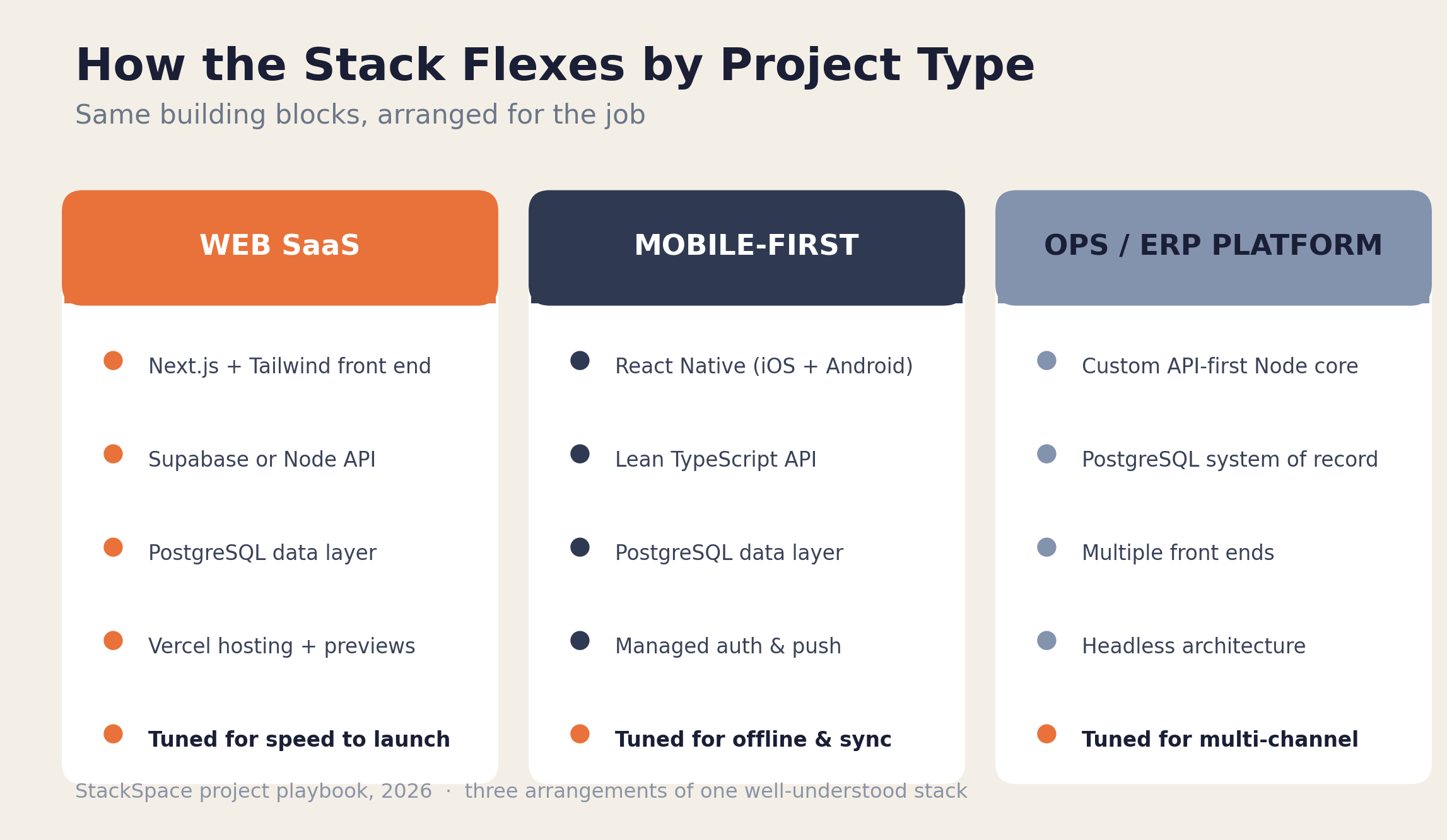
Here's how the same toolkit gets arranged for the three project shapes we build most:
- Web SaaS / dashboards. Next.js front end, Supabase or a Node API, Postgres, Vercel hosting. The priority is speed to a working product and fast iteration, which is why this is the shape that benefits most from managed services. It's also the most common MVP shape — see MVP Development Cost Breakdown for what this actually costs to build.
- Mobile-first apps. React Native for the client, a lean TypeScript API behind it, Postgres for data, and managed services for auth and push. The emphasis shifts to offline behavior, real-time sync, and a smooth cross-platform experience.
- Operations and ERP platforms. This is where we most often go custom: a dedicated, API-first Node backend over Postgres, with multiple front ends (a back-office portal, a field app, a customer portal) all consuming one core. This is the headless pattern we described in What Is a Headless ERP?, and it's the right shape when a business runs across many channels. If you're still deciding whether to build at all, start with Off-the-Shelf ERP vs Custom-Built.
The point of a default stack is that these aren't three different technology bets — they're three arrangements of the same well-understood pieces. That's what keeps our team fast across very different projects.
The Full Stack at a Glance
Here's the whole default stack in one view, with the honest note on when we leave each default. The left column is what we reach for first; the right column is the deviation and its trigger.
| Layer | Our 2026 default | When we deviate |
|---|---|---|
| Web frontend | Next.js + React + TypeScript | Static-only site → lighter framework |
| Mobile | React Native | Native or Flutter for perf/platform depth |
| Styling | Tailwind CSS | Design-system component lib if required |
| Backend / API | TypeScript — Supabase or Node (NestJS/Fastify) | Heavy domain logic → custom Node service |
| Database | PostgreSQL | Redis/search/object store as workload demands |
| AI layer | Claude + RAG over pgvector | Specialized models for niche tasks |
| Hosting | Vercel + managed Postgres | Dedicated cloud for residency/scale/regulation |
| CI/CD | GitHub Actions + preview deploys | Client's existing pipeline if mandated |
If a project doesn't show up in the right column anywhere, it ships on the pure default — and that's most projects. The deviations cluster in operations platforms and regulated industries, exactly where the extra control earns its cost.
What We Deliberately Don't Use (and Why)
Just as telling as what we use is what we avoid. We steer clear of bleeding-edge frameworks, heavyweight infrastructure for small projects, proprietary tools that trap data, and "resume-driven" technology choices. A studio's job is to make boring, durable bets on its clients' behalf — not to experiment on their budget.
- Bleeding-edge frameworks. A framework that's six months old with three Stack Overflow answers is a liability on a client project. We let other people's production systems do the beta testing; we adopt once a tool is proven and hireable.
- Heavy infrastructure for light needs. Kubernetes, microservices, and event-sourcing are real tools for real problems — and overkill for a CRUD app with 200 users. Premature complexity is one of the most expensive mistakes in software, and we'd rather start simple and split later if scale actually demands it.
- Lock-in we can't escape. We avoid proprietary platforms that hold a client's data hostage or make leaving prohibitively expensive. Open-source cores and portable data are a deliberate choice, so the client is never our hostage and we're never theirs.
- Resume-driven development. Picking a technology because an engineer wants it on their CV is a quiet, common failure mode. Every default on this list has to serve the client first. If a newer tool genuinely wins on our five criteria, it earns its way in — on merit, not novelty.
This restraint isn't conservatism for its own sake. It's that the cost of a trendy wrong choice lands on the client months after we've moved on, and a studio that wants long relationships can't afford to make those bets carelessly.
Frequently Asked Questions
What is StackSpace's default tech stack in 2026?
Next.js and React Native on the front end, a TypeScript backend (Supabase or a custom Node API) over PostgreSQL, hosted on Vercel and managed cloud infrastructure, with an AI layer built on Claude and pgvector. It's a default we start every project from and deviate from only with a documented reason.
Why do you default to PostgreSQL instead of a NoSQL database?
PostgreSQL handles relational data, JSON documents, full-text search, and AI vector search (via pgvector) in a single, battle-tested, open-source engine. Most projects never outgrow it, and keeping data in one well-understood store dramatically lowers operational complexity. We add NoSQL or specialized stores only when a specific workload genuinely requires it.
Do you build mobile apps natively or with React Native?
We default to React Native because one shared codebase ships both iOS and Android, which fits most client budgets. We go fully native or use Flutter when a project needs heavy graphics, deep platform integration, or performance that cross-platform can't deliver. We explain the decision in detail in our Next.js vs React Native vs Flutter guide.
How do you decide between a managed backend like Supabase and a custom one?
We use managed services for undifferentiated work — auth, storage, basic APIs — and build custom when the business logic is complex, the integrations are demanding, or we need full control over request handling. Many projects use both. Our full breakdown is in Supabase vs Firebase vs Custom Backend.
Will I be locked into your tech stack if we work together?
No — avoiding lock-in is one of our core selection criteria. We favor open-source cores, portable data, and widely-known tools precisely so a client's in-house team can take over the codebase later, or hire from the large local talent pool to maintain it. The exit cost is something we optimize on the client's behalf.
Does every project include AI?
No. We add AI only where it removes real work — automating an operations process, grounding an assistant in a client's data, extracting information from documents. When AI does fit, Claude with RAG over pgvector is our default, and we favor narrow, reliable agents over sprawling autonomous systems. See 5 Business Processes You Can Automate with AI Agents Today.
Key Takeaways
- We have a default stack, not a single stack. Next.js, React Native, TypeScript, PostgreSQL, Vercel, and Claude form the base; the value is in knowing when to deviate.
- Five criteria decide every tool: speed to first version, maintainability, the local hiring pool, total cost of ownership, and exit cost. A default has to win on all five.
- PostgreSQL does almost everything. Relational data, JSON, search, and AI vectors in one engine means fewer moving parts and lower operational risk.
- Managed infrastructure by default. Vercel and managed Postgres let our engineers spend time on the product, not on operating servers — we go custom only for residency, scale, or regulation.
- The stack flexes by project type — web SaaS, mobile-first, and operations platforms are three arrangements of the same well-understood pieces.
- What we avoid matters as much as what we use: no bleeding-edge bets, no premature complexity, no lock-in, no resume-driven choices on a client's budget.
If you're evaluating a partner for a custom build and want to talk through what the right stack looks like for your project specifically, book a free consultation call. We'll walk through your requirements, recommend an architecture, and tell you honestly where the default fits and where your project needs something different.
Further reading: Next.js vs React Native vs Flutter: How to Choose Your Stack in 2026, Supabase vs Firebase vs Custom Backend, and How We Scope a Custom Software Project in 48 Hours.
Written by
Jabez Borja
More articles
How to Evaluate If Your Business Is Ready for AI Automation
A practical AI readiness assessment for business owners — the five dimensions that decide whether automation will pay off, a self-scoring scorecard, a step-by-step assessment process, and the green lights and red flags to check before you build.
Hidden Costs of Software Development Nobody Warns You About
The line items that don't show up in a software quote but blow up the budget anyway — maintenance, infrastructure, scope creep, integrations, and more. A 2026 breakdown with realistic ranges and a pre-signature checklist.
What Is a Headless ERP? Why Growing Companies Are Switching in 2026
A plain-English guide to headless ERP in 2026 — what it is, how the architecture differs from traditional ERP, why growing companies are switching, what it costs, and when it's the wrong call.
Want to build something?
We help businesses turn ideas into production software. Book a discovery call and let's talk about your project.