
Hidden Costs of Software Development Nobody Warns You About
The line items that don't show up in a software quote but blow up the budget anyway — maintenance, infrastructure, scope creep, integrations, and more. A 2026 breakdown with realistic ranges and a pre-signature checklist.
What Are the Hidden Costs of Software Development?
The hidden costs of software development are the line items that never appear on the initial quote but show up later anyway: ongoing maintenance, third-party and infrastructure fees, scope creep, integrations and data migration, post-launch QA, onboarding and documentation, and security and compliance. Together they routinely add 50–100% to the headline build price over a few years.
The quote you sign covers the build. It rarely covers the life of the software — and the life is where most of the money goes. A founder who budgets only for the build is budgeting for roughly half the real cost, then gets blindsided when the "finished" product keeps generating invoices.
This post is the honest list. We'll walk through each hidden cost, give realistic 2026 ranges, and end with a pre-signature checklist you can use to pressure-test any quote before you sign it. None of this is meant to scare you off building — it's meant to make sure the number in your head matches the number you'll actually pay.
Why Hidden Costs Blow Up Software Budgets
Hidden costs blow up budgets because software is a living system, not a deliverable. A quote prices a fixed scope at a fixed moment; the real world keeps moving — users find edge cases, dependencies need updates, the business changes, and integrations break. Each of those is a cost the original quote never modeled.
Three structural reasons make this near-universal:
- Quotes price the build, not the lifecycle. Most proposals stop at "ship the v1." But a typical product spends years in production, and every one of those years has a maintenance, infrastructure, and support bill attached.
- Estimates are made when you know the least. A scope is locked before discovery is finished, so the estimate is built on assumptions that reality later contradicts. We wrote about closing that gap in How We Scope a Custom Software Project in 48 Hours.
- Incentives don't reward honesty. A vendor who quotes the full lifecycle cost looks more expensive than one who quotes only the build. The cheap-looking quote often wins — and the difference reappears as "unexpected" invoices later.
The fix isn't paranoia, it's accounting. If you know the categories below exist, you can budget for them on purpose instead of discovering them by surprise.
Hidden Cost #1: Ongoing Maintenance and Support
Ongoing maintenance is the single largest hidden cost, and it never ends. Plan for 15–25% of the original build cost every single year to cover bug fixes, dependency and security updates, library upgrades, and the small adjustments a live product constantly needs. Over three to four years, maintenance alone can equal the entire original build price.
Software decays even when you don't touch it. The frameworks it's built on ship new versions, security patches land, browsers and operating systems change, and APIs you depend on get deprecated. Ignoring maintenance doesn't save money — it converts a steady, predictable cost into a large, urgent one when something finally breaks in production.
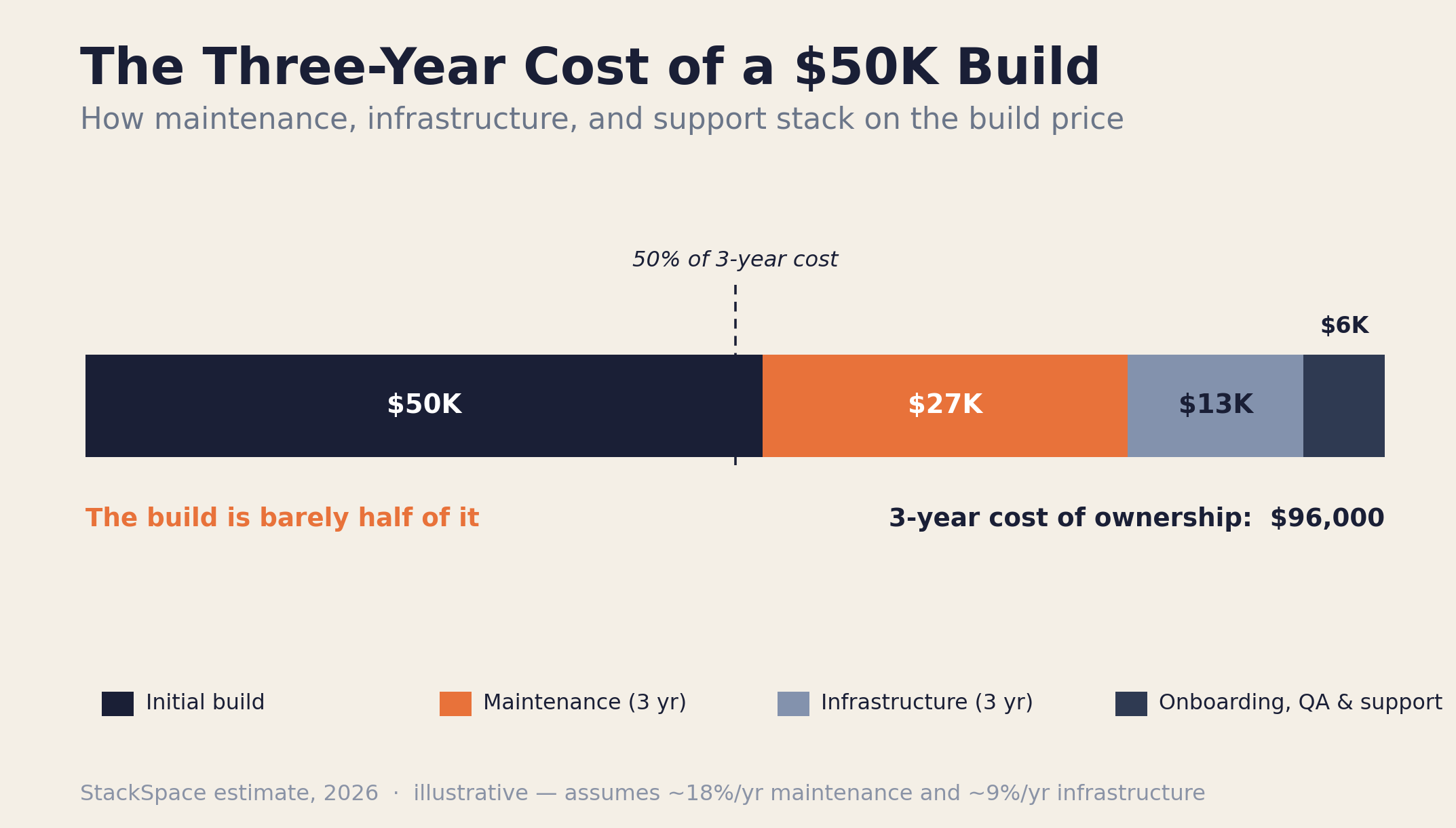
The chart above shows the pattern we see across client projects: a $50,000 build is barely half of what the same software costs to own over three years once maintenance, infrastructure, and support are counted. This is the most important number a founder almost never asks for — the total cost of ownership, not the build price. We unpack the broader version of this in The True Cost of Building a Custom Web Application.
Hidden Cost #2: Third-Party Services and Infrastructure
Third-party and infrastructure costs are the recurring monthly bill that outlives the build. Hosting, managed databases, authentication, email and SMS, payment processing, monitoring, and per-seat SaaS tools typically run 5–15% of the build cost per year — and they scale up as your usage grows, not down.
Modern software is assembled from services, and most of them charge monthly. A single product might quietly accumulate a dozen line items:
| Service category | Examples | Typical monthly range |
|---|---|---|
| Hosting & compute | Vercel, managed cloud, serverless functions | $20 – $500+ |
| Database & storage | Managed PostgreSQL, object storage, backups | $25 – $400+ |
| Email, SMS & notifications | Transactional email, SMS, push providers | $15 – $300+ |
| Payments | Processor fees (per-transaction %) | ~2.9% + fixed per charge |
| Monitoring & error tracking | Uptime, logs, error tracking, analytics | $0 – $200+ |
| AI / LLM usage | Model API calls, embeddings, vector search | $10 – $1,000+ |
Individually these look trivial. Together they're a real operating cost, and the usage-based ones — payments, AI, SMS, bandwidth — climb exactly when your product succeeds. Choosing a stack that keeps these predictable is a real economic decision; we covered the trade-offs in Supabase vs Firebase vs Custom Backend and the full default stack in Our Tech Stack for 2026.
Hidden Cost #3: Scope Creep and Change Requests
Scope creep is the most predictable budget-killer of all. Change requests, "small additions," and mid-build pivots commonly add 10–30% to a project, because every new requirement after the scope is locked is, by definition, work that wasn't priced. The phrase "while we're at it…" is the most expensive sentence in software.
Some scope change is healthy — you learn things mid-build that genuinely should reshape the product. The danger is undisciplined scope change: a steady drip of unbudgeted additions that nobody formally prices, each one small, the sum enormous. The cure isn't refusing all change; it's a change-request process that prices and approves each one so the trade-off is visible.
- Lock a clear v1 scope before building, with an explicit "later" list for everything that isn't core. A tight scope is the cheapest insurance you can buy.
- Treat every addition as a priced decision, not a favor. "Yes, and that adds X days and $Y" keeps the founder in control of the budget.
- Distinguish discovery-driven change from wishlist creep. The first is worth paying for; the second is worth deferring.
This is exactly why we front-load scoping — a sharp, agreed scope is the best defense against the 30% overrun. See How We Scope a Custom Software Project in 48 Hours for the process.
Hidden Cost #4: Integrations and Data Migration
Integrations and data migration are the costs that hide inside the word "just." Connecting to existing systems, importing legacy data, and matching another platform's quirks can add 5–20% to a build — and they carry the most schedule risk, because they depend on systems you don't control.
"Just connect it to our accounting software" and "just import our old data" are two of the most underestimated requests in software. The reality:
- Third-party APIs are messy. Rate limits, undocumented behavior, auth quirks, and sandbox-versus-production differences turn a "quick integration" into a multi-week investigation.
- Legacy data is dirty. Real-world data has duplicates, missing fields, inconsistent formats, and decades of accumulated exceptions. Cleaning and mapping it often costs more than writing the import itself.
- You're at the mercy of someone else's system. If a partner's API is slow, broken, or changes without notice, your timeline absorbs the damage.
When a project touches an established operations platform, this compounds — which is one reason API-first and headless architectures are worth the investment. We explained that pattern in What Is a Headless ERP?.
Hidden Cost #5: Post-Launch QA and Technical Debt
The work doesn't stop at launch — it intensifies. Budget 10–15% of the build for the post-launch stabilization period, when real users surface edge cases the test plan missed, plus an ongoing allowance for paying down technical debt before it compounds into something expensive.
Two related costs live here:
- Post-launch bug fixing. No matter how good the QA, production traffic finds things staging never did — unusual data, real-world network conditions, and users doing things nobody anticipated. The weeks right after launch are reliably busy, and pretending otherwise just means the cost arrives unbudgeted.
- Technical debt. Every shortcut taken to hit a deadline is a loan. Taken deliberately, debt is a smart tool — ship now, refactor later. Ignored, it compounds: each new feature gets slower and riskier to build on a shaky foundation, until a "simple" change takes weeks. Paying it down on purpose is far cheaper than a forced rewrite.
A vendor who never mentions post-launch support or technical debt isn't being optimistic — they're leaving a cost off the page that you'll pay regardless.
Hidden Cost #6: Onboarding, Documentation, and Training
The software working isn't the same as your team using it. Onboarding, documentation, and training typically add 3–10% to a project, and skipping them quietly destroys the return on the whole build — software nobody adopts delivers zero of the value it was supposed to.
This is the cost most founders forget entirely, because it doesn't feel like "development." But it's real work:
- Documentation — admin guides, API docs, and the runbook a future engineer (yours or ours) needs to operate the system without an archaeology dig.
- Training and change management — getting staff to actually switch from the spreadsheet or the old tool. Internal resistance is the quiet reason many internal tools fail, no matter how good the code is.
- Knowledge transfer — if you ever change vendors or bring development in-house, the cost of handing over context is real. A stack built on widely-known tools and a large local hiring pool keeps that cheap, which is part of why we choose tools the way we do.
Budget for adoption, not just delivery. A product that ships and a product that gets used are separated by this line item.
Hidden Cost #7: Security, Compliance, and Downtime
Security and compliance are cheap to build in and brutally expensive to bolt on. Depending on your industry and data, this can add 5–15% to a build — and the cost of ignoring it (a breach, a failed audit, or unplanned downtime) is in a different order of magnitude entirely.
The visible costs are things like SSL, secure authentication, backups, monitoring, and — if you handle regulated data — the audits and controls a standard like PCI, HIPAA, or local data-privacy law requires. The invisible cost is the tail risk: a single security incident or a multi-day outage can cost more than the entire project, in remediation, lost revenue, and lost trust.
The trap is that none of this is visible in a demo. A product can look finished and be wide open. When you compare quotes, a number that's conspicuously low is often low because security, backups, and monitoring were left out — not because the vendor found efficiencies.
The Hidden-Cost Checklist: What Each One Typically Adds
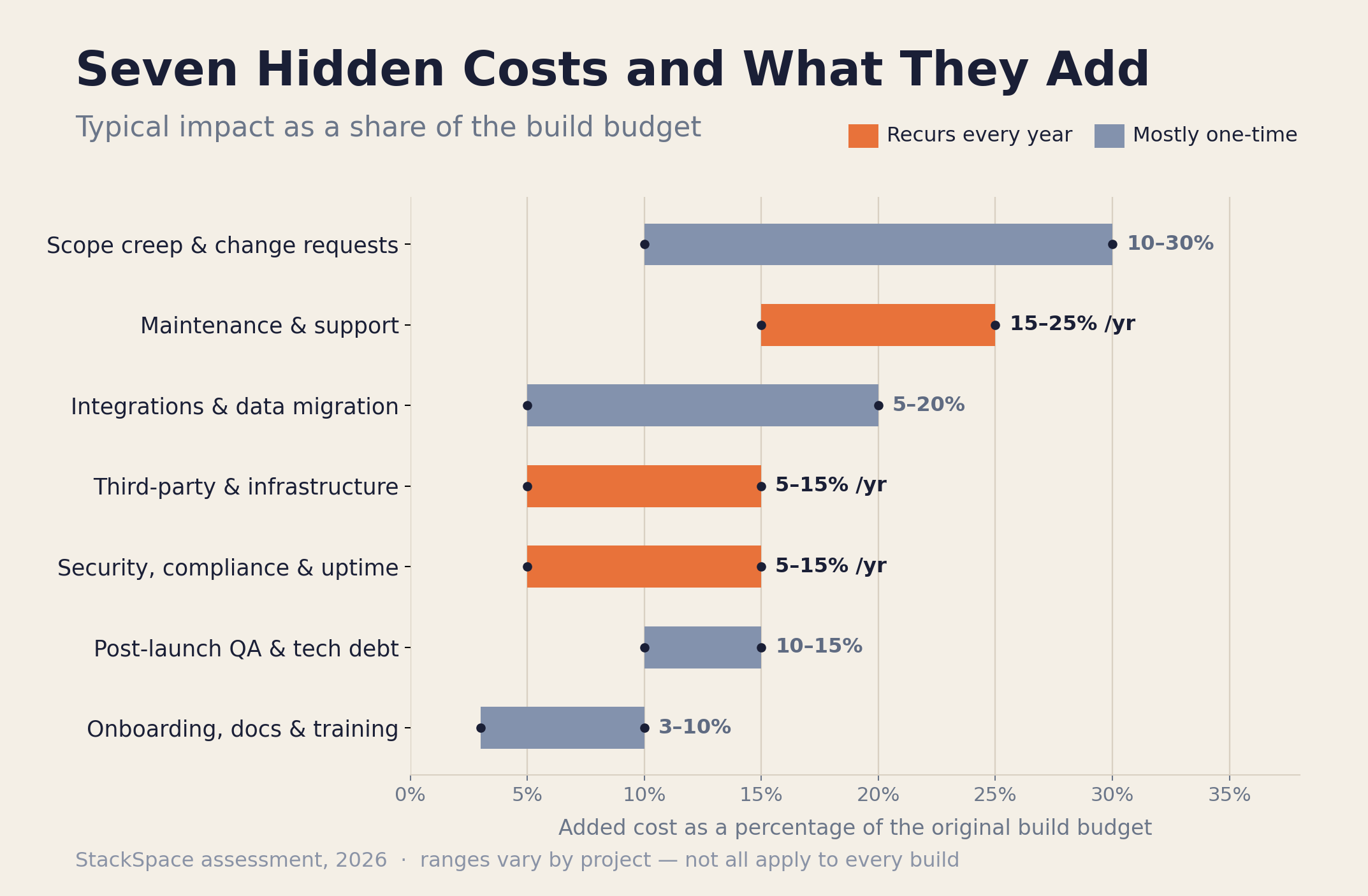
Here's the whole list in one view. The ranges are expressed as a percentage of the original build cost, drawn from what we see across real client projects — annual items are marked, because those recur every year for the life of the software.
| Hidden cost | Typical impact | Recurs? |
|---|---|---|
| Ongoing maintenance & support | 15–25% of build | Every year |
| Third-party services & infrastructure | 5–15% of build | Every year |
| Scope creep & change requests | 10–30% of build | One-time (per build) |
| Integrations & data migration | 5–20% of build | One-time (mostly) |
| Post-launch QA & technical debt | 10–15% of build | Ongoing allowance |
| Onboarding, docs & training | 3–10% of build | One-time + refreshes |
| Security, compliance & downtime | 5–15% of build | Build + ongoing |
You won't pay every line at the top of its range, and some won't apply to your project at all. But add the realistic ones together and the conclusion is hard to escape: the build is the down payment, not the price.
How to Budget So Hidden Costs Don't Surprise You
Budget for the lifecycle, not the launch. The simplest rule that works: take the build quote, add 15–25% per year for maintenance and infrastructure, set aside a 15–20% contingency for scope and integration surprises, and evaluate the total over three years — not the build number in isolation.
In practice:
- Quote the build, then model three years. A $50K build with realistic ongoing costs is closer to a $90K–$100K three-year commitment. Decide with that number, not the sticker.
- Hold a contingency you don't touch lightly. A 15–20% reserve absorbs the integration that fought back and the scope you couldn't foresee. Projects without one don't have fewer surprises — they just have fights about who pays.
- Compare vendors on total cost of ownership. The cheapest build quote frequently has the most hidden costs. Ask every vendor what isn't included; the answer tells you more than the price. Our broader cost guides — MVP Development Cost Breakdown and the Custom Software Cost in the Philippines guide — show what realistic, all-in numbers look like.
- Insist on a written scope and a change process. The single best defense against the biggest hidden cost is a clear scope with an explicit, priced way to change it.
A good partner will volunteer most of this before you ask. That willingness to talk about the costs after the invoice is one of the clearest signals you've found the right one.
Before You Sign: The Hidden-Cost Checklist
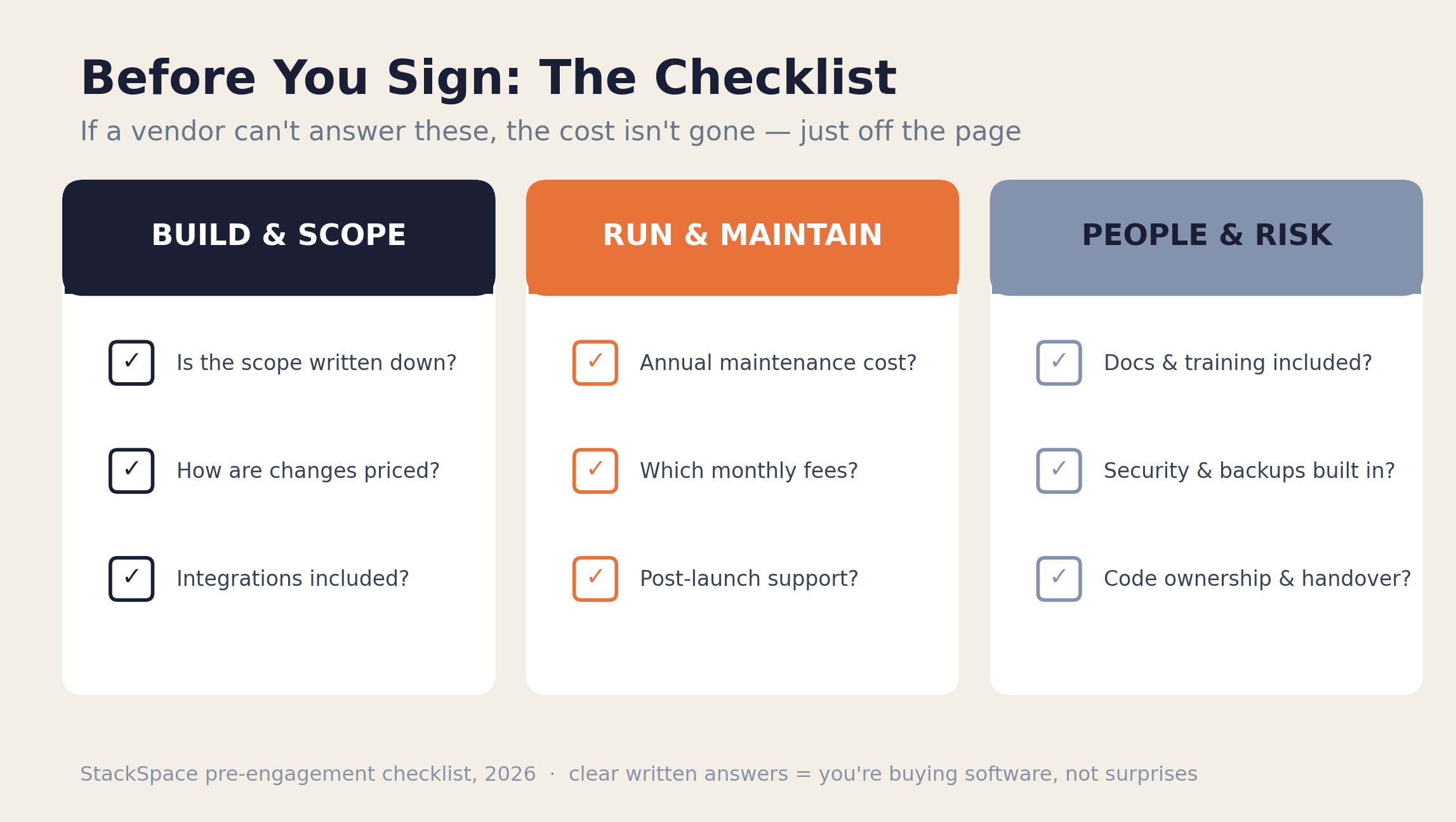
Use these questions to pressure-test any quote. If a vendor can't answer them clearly, the cost hasn't disappeared — it's just been left off the page for you to find later.
Build & scope
- Is the scope written down, and what's explicitly out of it?
- How are change requests priced and approved once we start?
- Does the quote include integrations and data migration, or are those separate?
Run & maintain
- What does ongoing maintenance cost per year, and what does it cover?
- Which third-party services will I pay for monthly, and what are they?
- What happens after launch — is there a stabilization or support period?
People & risk
- Is documentation, onboarding, and training included?
- What security, backup, and monitoring measures are built in?
- If we part ways, how does knowledge transfer work, and who owns the code?
If the answers are clear and written down, you're buying software. If they're vague or "we'll figure it out later," you're buying surprises.
Frequently Asked Questions
What are the most commonly overlooked costs in software development?
The most overlooked costs are ongoing maintenance (15–25% of the build per year), recurring third-party and infrastructure fees, post-launch bug fixing, and onboarding and training. These don't appear on a typical build quote because the quote prices the build, not the multi-year life of the software — yet over time they often exceed the original build cost.
How much should I budget for software maintenance?
Budget 15–25% of the original build cost per year for ongoing maintenance and support. This covers bug fixes, security patches, dependency upgrades, and small adjustments. Over three to four years, maintenance alone can add up to roughly the entire original build price, which is why total cost of ownership matters more than the build number.
Why do software projects go over budget so often?
Software projects overrun mainly because of scope creep, underestimated integrations, and quotes that price only the build instead of the full lifecycle. Estimates are locked before discovery is complete, so they rest on assumptions reality later contradicts. A written scope, a priced change-request process, and a 15–20% contingency are the most effective defenses.
Are hidden costs a sign of a dishonest software vendor?
Not necessarily — but a vendor who never mentions them is a red flag. The honest move is to surface maintenance, infrastructure, and support costs upfront, even though it makes the quote look more expensive than a competitor who hides them. Ask every vendor what isn't included; the willingness to answer is a strong signal of integrity.
How do I compare two software quotes fairly?
Compare them on three-year total cost of ownership, not the build price. Ask each vendor what's excluded — maintenance, integrations, third-party services, support, security. A low build quote often wins by leaving the most off the page. The real comparison is the all-in number over the life of the software, including the recurring lines.
Do these hidden costs apply to no-code or off-the-shelf software too?
Yes, in a different shape. No-code and off-the-shelf tools trade a lower build cost for recurring per-seat licensing, integration limits, and platform lock-in that grows with you. The line items differ, but the principle holds: the sticker price is rarely the real price. We compared the trade-offs in Off-the-Shelf ERP vs Custom-Built.
Key Takeaways
- The build is the down payment, not the price. A typical product costs 50–100% more to own over a few years than the build quote suggests, once the recurring lines are counted.
- Maintenance is the biggest hidden cost — plan for 15–25% of the build every year, indefinitely. Over three to four years it can equal the entire original build.
- Scope creep is the most predictable overrun, adding 10–30%. A written scope and a priced change process are the cheapest insurance you can buy.
- Recurring third-party and infrastructure fees scale up with success, not down — and the usage-based ones climb exactly when your product is winning.
- Onboarding, security, and integrations are the quiet ones — easy to leave off a quote, expensive to bolt on, and decisive for whether the software actually delivers value.
- Budget the lifecycle, compare on total cost of ownership, and hold a 15–20% contingency. The right partner will talk about these costs before you ask.
If you want a quote that shows the whole picture — build, run, and risk — rather than a number engineered to look small, book a free consultation call. We'll walk through your project and tell you honestly what it costs to build and to own.
Further reading: The True Cost of Building a Custom Web Application, MVP Development Cost Breakdown: What You'll Actually Pay in 2026, and How We Scope a Custom Software Project in 48 Hours.
Written by
Jabez Borja
More articles
How to Evaluate If Your Business Is Ready for AI Automation
A practical AI readiness assessment for business owners — the five dimensions that decide whether automation will pay off, a self-scoring scorecard, a step-by-step assessment process, and the green lights and red flags to check before you build.
Our Tech Stack for Building Client Projects in 2026: Tools, Infra, and Why
A transparent look at the tech stack StackSpace uses to build client projects in 2026 — the frontend, backend, database, infrastructure, and AI tools we default to, the criteria we choose them on, and where we deliberately deviate.
What Is a Headless ERP? Why Growing Companies Are Switching in 2026
A plain-English guide to headless ERP in 2026 — what it is, how the architecture differs from traditional ERP, why growing companies are switching, what it costs, and when it's the wrong call.
Want to build something?
We help businesses turn ideas into production software. Book a discovery call and let's talk about your project.